Identifying and Prioritizing Age-Friendly Design Principles and Guidelines for Developing Transportation Planning E-Tools: Scoping Review
Sara Bahrampoor Givi, Mireille Gagnon-Roy, Véronique Provencher

TL;DR
This paper identifies and ranks age-friendly design principles for transportation e-tools to better support older adults' usability and independence.
Contribution
The novel contribution is a prioritized set of age-friendly usability guidelines for transportation e-tools, derived from a scoping review and expert analysis.
Findings
Sixty-eight actionable age-friendly guidelines were distilled from 31 studies and grouped into 10 usability principles.
Visual clarity, structure and navigation, and ease of use were ranked as the top three design priorities.
The guidelines aim to improve digital inclusion and usability for older adults in transportation planning tools.
Abstract
Older adults often face mobility challenges and usability barriers when navigating transportation options due to age-related physical, cognitive, and sensory changes. While transportation planning e-tools can support their independence, most are not designed for their specific needs. There is a lack of comprehensive, age-friendly usability design principles tailored to this context. This study aims to identify, synthesize, and prioritize the most relevant age-friendly usability design principles and guidelines for developing transportation planning e-tools that are tailored to the needs of older adults. A scoping review was conducted following the Arksey and O’Malley methodological framework, enhanced by guidance from the Joanna Briggs Institute and reported according to the PRISMA-ScR (Preferred Reporting Items for Systematic Reviews and Meta-Analyses Extension for Scoping Reviews)…
Genes, proteins, chemicals, diseases, species, mutations and cell lines named across the full text — each resolved to its canonical identifier and authoritative record.
Click any figure to enlarge with its caption.
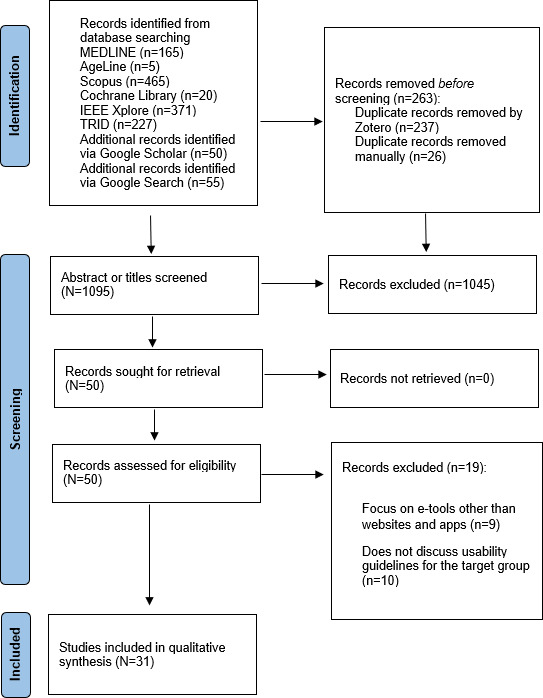 Figure 1
| Concepts | Keywords | Controlled vocabulary (by database) |
|---|---|---|
| Aging | “Older adult” OR “Old people” OR “Elderly” OR “Senior” OR “Aging” OR “Normal aging” OR “Frailty” OR “Aged” OR Old* |
MEDLINE or Cochrane Library: aged (MeSH AgeLine: aged, older adults TRID: elderly persons (thesaurus) |
| E-tool | “Website” OR “Application” OR “E-tool” OR “Web application” OR “App” OR “Web” |
MEDLINE or Cochrane Library: mobile applications (MeSH) IEEE Xplore: software applications (IEEE thesaurus) TRID: websites (TRID thesaurus) |
| Guideline | “Design principles” OR “Web design principle” OR “Design guideline” OR “Web design guideline” OR “Usability guideline” OR “User interface design guideline” OR “UI design guideline” OR “User experience design guideline” OR “UX design guideline” OR “GUI” OR “Graphical user interface” |
MEDLINE or Cochrane Library: user-computer interface (MeSH) and guidelines as topic (MeSH) AgeLine: human-computer interaction and usability engineering TRID: Human factors engineering |
| Transport | “transport* OR “public transport*” OR mobility* OR travel OR “public transit” OR “active transport*” OR “alternative transport” OR paratransit OR bus* OR carpool* |
MEDLINE or Cochrane Library: transportation (MeSH) AgeLine: transportation TRID: transit, mobility, and public transportation |
| Principles and guidelines | Shneiderman | Nielsen | Weinschenk and Barker | Gerhardt‐Powals | |
|---|---|---|---|---|---|
| Feedback | |||||
| ✓ | ✓ | ✓ | |||
| Confirmation of the actions that are done successfully | ✓ | ✓ | ✓ | ||
| Let users be aware of results | ✓ | ||||
| Consistency | |||||
| ✓ | |||||
| Consistency in using familiar icons and colors | ✓ | ✓ | ✓ | ||
| Minimizing the memory load | |||||
| ✓ | ✓ | ✓ | |||
| Avoid changes in familiar behavior to speed up the action of the experienced users | ✓ | ||||
| Simplicity | |||||
| ✓ | ✓ | ✓ | |||
| Simple and relevant information (eliminate unnecessary information to reduce the use of the resource in multitasks) | ✓ | ✓ | |||
| Simple layout | ✓ | ✓ | |||
| Accessibility | |||||
| ✓ | ✓ | ||||
| Flexibility in providing information for a wide range of users with different cognitive abilities, in different tasks, for both experienced and novice users | ✓ | ✓ | |||
| Structure and navigation | |||||
| Error prevention by implying target limitation (eg, do not allow the user to enter numeric characters in alphabetic fields) | ✓ | ✓ | ✓ | ||
| Data grouping | ✓ | ||||
| Control | |||||
| ✓ | ✓ | ✓ | |||
| Command and control model to let users know how they should answer the questions and enter the information | ✓ | ||||
| Ease of use | |||||
| ✓ | ✓ | ||||
| Visual clarity | |||||
| ✓ | |||||
| Information | |||||
| ✓ | |||||
| Title | Year | Context of the study | E-tool type | Number of guidelines identified |
|---|---|---|---|---|
| 2019 | Religion | App | 3 | |
| 2023 | Public services | App | 22 | |
| Android OS [ | 2019 | — | App | 5 |
| 2014 | Gaming | App | 8 | |
| 2021 | Gaming | App | 2 | |
| 2024 | — | — | 9 | |
| 2021 | — | Website | 56 | |
| 2016 | — | Website | 40 | |
| 2024 | — | — | 9 | |
| 2015 | — | App | 5 | |
| 2017 | — | App | 121 | |
| 2023 | — | App | 19 | |
| 2024 | — | — | 3 | |
| 2023 | — | — | 17 | |
| 2017 | Health | Website | 25 | |
| 2019 | Health | App | 19 | |
| 2023 | Health | App | 1 | |
| 2001 | — | Website | 22 | |
| 2019 | Health | App | 5 | |
| 2015 | — | App | 16 | |
| 2018 | — | App | 19 | |
| 2023 | Health | App | 7 | |
| 2016 | — | App | 5 | |
| 2017 | — | App | 5 | |
| 2015 | Tourism | Website | 14 | |
| 2021 | Communication | App | 5 | |
| — | — | Website or app | 9 | |
| — | — | Website or app | 12 | |
| — | — | Website or app | 3 | |
| — | — | — | 9 | |
| — | — | — | 5 |
| Principles | Frequency of referral, n (%) |
|---|---|
| Visual clarity | 133 (26.6) |
| Structure and navigation | 82 (16.4) |
| Ease of use | 63 (12.6) |
| Information | 48 (9.6) |
| Minimizing the memory load | 39 (7.8) |
| Feedback | 31 (6.2) |
| Accessibility | 29 (5.8) |
| Consistency | 25 (5) |
| Simplicity | 25 (5) |
| Control | 25 (5) |
| Principles and guidelines | Relevant studies | |
|---|---|---|
| Feedback | ||
| [ | ||
| Request confirmation before performing actions that could cause significant changes or data loss, and confirm successful actions | [ | |
| Consistency | ||
| | [ | |
| Present information clearly by using familiar frameworks and structures, and apply consistent navigation patterns and layouts. | [ | |
| Underline text only when it is a link. | [ | |
| Minimizing the memory load | ||
| [ | ||
| Avoid complex dynamic input fields that require multiple gestures or the use of both hands. | [ | |
| Eliminate unnecessary or repetitive actions. | [ | |
| Limit the number of key functions on the home screen to 12 or fewer for tablets and 6 or fewer for smartphones. | [ | |
| Avoid changes in familiar behavior to speed up the actions of experienced users. | [ | |
| Use images, videos, or audio to complement text information. | [ | |
| Minimize time-sensitive content and provide options to adjust or extend time limits if necessary. | [ | |
| Simplicity | ||
| [ | ||
| Use simple and easy-to-understand graphics. | [ | |
| Ensure simplicity, clarity, and consistency in screen layout, navigation, and terminology. | [ | |
| Provide simple error messages (not codes). | [ | |
| Accessibility | ||
| [ | ||
| Ensure button accessibility with a universal approach, accommodating left-handed users. | [ | |
| Use icons alongside text labels. | [ | |
| Include alternative data entry methods for users unable to use the primary method. | [ | |
| Ensure the app interface adapts to device rotation and user attempts to enlarge screen content. | [ | |
| Provide content in various multimedia formats, such as text, videos, pictures, and audio. | [ | |
| Structure and navigation | ||
| [ | ||
| Offer both click-to-zoom and 2-finger zoom gestures. | [ | |
| Minimize data entry steps to ideally fewer than 3. | [ | |
| Provide help tutorials or brief animated instructions. | [ | |
| Clearly indicate touchable or clickable elements. | [ | |
| Position key elements (eg, buttons and information) at the center of the screen. | [ | |
| Guide users with systematic navigation to indicate their location and the next step. | [ | |
| Provide a virtual keyboard for numerical or alphabetical entry. | [ | |
| Use a short, simple, and static pull-down menu. | [ | |
| Include spell check for errors. | [ | |
| Maintain hierarchy in feedback, navigation, visual design, and data grouping. | [ | |
| Avoid using scroll bars, especially horizontally. | [ | |
| Position search tools at the top right. | [ | |
| Control | ||
| [ | ||
| Consider the home menu as a safe return point. | [ | |
| Ability to control requests by undoing, redoing, and exiting. | [ | |
| Avoid disappearing messages; let users close them manually. | [ | |
| Offer adjustable text sizes, color schemes, and contrast to enable personalization of the user experience. | [ | |
| Ease of use | ||
| [ | ||
| Make account creation optional for users. | [ | |
| Incorporate autosave features whenever possible. | [ | |
| Provide support for both orientations. | [ | |
| Include automatic data entry (eg, time and date) to reduce data entry time and keyboard use. | [ | |
| Ensure easy access to help and support. | [ | |
| Consider target touch areas of at least 9 x 9 mm, with a minimum of 8 dp of inactive space between them. | [ | |
| Visual clarity | ||
| [ | ||
| Avoid using all capital letters words. | [ | |
| Consider 3:1 and 4:1 color contrast ratio for text and large text respectively. | [ | |
| Adjust the contrast range between 1.7 and 3.0. | [ | |
| Use blue, red, and magenta as the link colors on a white background due to their high visibility. | [ | |
| Use brightness levels of 75% and 50%. | [ | |
| Use font sizes of 12 point to 14 point for body text and 16 point for titles. | [ | |
| Use sans serif fonts like Arial, Helvetica, and Tahoma. | [ | |
| Avoid justified alignment, unfilled text, text shadows, large blocks of italic or bold text, and underlined text. | [ | |
| Maintain line spacing between 1.5 to 2. | [ | |
| Consider using bold typefaces for emphasis. | [ | |
| Avoid complex and distracting elements such as animations, blinking text, patterned backgrounds, pure white backgrounds, pure black text on white backgrounds, and transparent menus. | [ | |
| Information | ||
| [ | ||
| Avoid unclear or ambiguous language. | [ | |
| Do not use abbreviations or symbols. | [ | |
| Ensure each page has a clear and descriptive title. | [ | |
| Avoid using Roman numerals. | [ | |
| Use short sentences (less than 70 characters per line) and paragraphs (each focusing on a single idea) and avoid hyphenating words at the end of lines. | [ | |
| Highlight important information for better visibility. | [ | |
| Use active voice to enhance clarity. | [ | |
| Use names that are conceptually related to function. | [ | |
| Principles | Rank | Priority, % |
|---|---|---|
| Visual clarity | 1 | 36.4 |
| Structure and navigation | 2 | 22.1 |
| Ease of use | 3 | 12.5 |
| Information | 4 | 10.5 |
| Minimizing the memory load | 5 | 6.3 |
| Feedback | 6 | 3.8 |
| Accessibility | 7 | 2.8 |
| Consistency | 8 | 2.1 |
| Simplicity | 9 | 1.9 |
| Control | 10 | 1.8 |
Peer Reviews
No public reviews on file for this paper yet. If you reviewed it on a platform where reviews are public (OpenReview, ICLR, NeurIPS, ICML), you can paste yours below so the community can read it here.
Videos
No videos yet. Explain this paper in a talk, walkthrough, or lecture? Add one.
Taxonomy
TopicsOlder Adults Driving Studies · Technology Use by Older Adults · Urban Transport and Accessibility
Introduction
Background
As people age, they often encounter mobility-related difficulties, which can significantly impact their ability to engage in society [1]. These difficulties can make everyday activities, such as attending medical appointments or participating in social and recreational events, increasingly challenging [2]. Reduced physical capacity, changes in vision [3] and balance [4], as well as the onset of chronic illnesses [4], contribute to these mobility issues. As a result, many older adults find it difficult to maintain the independence and social connections that are crucial to their overall well-being [5]. Addressing these challenges requires a comprehensive approach, including accessible transportation options that help older adults remain active and engaged in their daily lives, despite steep hills and heavy snowfall, which are common in Nordic countries like Canada.
In the province of Quebec (Canada), data from 2019 show that approximately 64% of older adults drive and 23% travel as passengers, while about 9% use taxis, adapted transport, or public transit, and only 3% rely on walking, cycling, or mobility devices. Men were more likely than women to drive (80% vs 50%), while women more often traveled as passengers (35% vs 10%) and used taxis, paratransit, or public transit more frequently (12% vs 7%) [6]. Although only a small proportion of older adults use public or shared transportation, studies indicate that this limited use does not necessarily reflect a lack of interest but rather barriers such as safety concerns, difficulties accessing clear travel information, and a lack of confidence or comfort when using available options like buses—often due to fears of becoming disoriented or encountering unwanted social interactions [78].
To mitigate these challenges, there is a growing need for transportation planning e-tools that can assist older adults in accessing reliable information about their travel options. E-tools (eg, route-planning systems) could help drivers feel safer by avoiding hazardous routes, such as steep hills or poorly lit roads, particularly in challenging conditions [9]. However, engaging with such digital tools often proves difficult for this population. Age-related changes such as reduced visual sensitivity [10] can make it hard to accurately select interactive elements, thereby disrupting the overall trip-planning experience [11]. In addition, cognitive factors, such as reduced attention, can make it more difficult to navigate digital interfaces [12]. Consequently, the design of transportation planning e-tools must consider both the functional changes associated with aging and the diversity in digital competencies among older adults [13]. It is therefore essential to adapt these tools, particularly their interfaces, to better meet the needs of older adults.
Given the notable lack of studies specifically focused on developing and evaluating transport planning interfaces tailored to the needs and preferences of older adults through a participatory design approach [14], it becomes increasingly important to identify comprehensive age-friendly design principles and usability guidelines. While a number of design frameworks exist for general usability [15], few explicitly address the cognitive, physical, and perceptual changes associated with aging [1617]. Without clear, context-specific design guidance, there is a risk that digital solutions will continue to fall short of accessibility and usability standards for this population. A systematic synthesis of existing guidelines is relevant to ensure that future e-tool interfaces are not only inclusive but also practical, empowering older adults to confidently plan and manage their trips. It is therefore essential to fill the gap by identifying, consolidating, and prioritizing existing age-friendly usability design principles to inform the development of transportation planning e-tools that are both effective and attuned to the diverse capabilities of older users.
Objective
This study aims to identify, synthesize, and prioritize the most relevant age-friendly usability design principles and guidelines for developing transportation planning e-tools that are tailored to the needs of older adults.
Methods
Study Design
This scoping review was conducted using the methodological framework proposed by Arksey and O’Malley [18], which includes five stages: (1) identifying the research question; (2) identifying relevant sources; (3) selecting studies; (4) charting the data; and (5) collating, summarizing, and reporting the results. Methodological guidance from the Joanna Briggs Institute was also integrated to enhance the rigor of the review. The reporting process adheres to the PRISMA-ScR (Preferred Reporting Items for Systematic Reviews and Meta-Analyses Extension for Scoping Reviews) guidelines (Checklist 1) [19]. In the second phase, the analytic hierarchy process (AHP) [20] was used to prioritize the age-friendly usability design principles identified through the scoping review.
Scoping Review: Identifying the Research Question
The study is guided by the following research question: What are the most relevant age-friendly usability design principles and guidelines for developing transportation planning e-tools tailored to the needs of older adults? This question was structured using the population, concept, and context (PCC) framework, where the population is older adults, the concept focuses on age-friendly usability design principles and guidelines, and the context involves the development of transportation planning e-tools.
Identifying the Relevant Sources
This stage consisted of searching scientific and gray literature published in English from January 2013 to May 2023, with an updated search conducted twice, in April 2024 and April 2025. This timeframe was selected to capture the most recent decade of research on age-friendly usability guidelines and transportation planning e-tools, reflecting rapid advances in digital technologies. The search was performed across six (6) scientific databases: MEDLINE (PubMed and National Center for Biotechnology Information), AgeLine (EBSCOhost), Cochrane Library (Wiley Online Library), Scopus (Elsevier), IEEE Xplore, and TRID (Transportation Research Board). To supplement the scientific literature, gray literature was identified through Google Scholar and Google Search, with the first 50 results from each platform screened for inclusion to ensure relevance and manageability.
The development of the search strategy followed a systematic and collaborative approach. Initially, authors compiled a list of relevant databases and preliminary keywords based on the study objectives. This preliminary version was then critically reviewed by a professional librarian, who contributed methodological expertise throughout the process. His recommendations were informed by the PRESS (Peer Review of Electronic Search Strategies) 2015 guidelines [21], leading to substantial improvements in keyword formulation, the use of Boolean operators, and the integration of controlled vocabulary terms. To improve the effectiveness of the search strategy, the professional librarian suggested running preliminary tests to evaluate how well the selected terms captured relevant studies. Based on the outcomes, he recommended several refinements. For example, the terms “Graphical User Interface” and “GUI” were added to ensure that studies using different terminology could be retrieved. These adjustments aimed to reduce the number of irrelevant results and to ensure that key studies were not overlooked.
Controlled vocabulary, such as Medical Subject Headings terms in PubMed, was mapped and complemented by a tailored list of free-text terms to reflect diverse indexing practices and author phrasing across databases. After executing the search, the results were imported into Zotero (Corporation for Digital Scholarship) for reference management. Initial deduplication was performed using Zotero’s automated function, followed by a thorough manual screening by the first author (SBG) to remove any remaining duplicate records. The final search strategy, including both controlled vocabulary and keywords, is presented in Table 1.
Selecting the Studies
To be eligible for inclusion, sources needed to address usability guidelines specifically aimed at older adults.
Sources were excluded if they met any of the following criteria: (1) written in a language other than English and (2) focused on e-tools other than websites or apps.
The first author (SBG) conducted the initial screening of all identified sources based on titles and abstracts, followed by a full-text review to assess their eligibility. To mitigate potential bias and strengthen the reliability of the process, 20% of the study selection was independently reviewed and validated by a co-author (VP). Specifically, the co-author independently reviewed 20% of the records retained after the title and abstract screening stage, as well as 20% of the studies assessed at the full-text eligibility stage, to verify inclusion decisions and ensure consistency.
Charting the Data
To chart the data, 4 pioneering sets of general usability guidelines were selected: Nielsen [15], Shneiderman and Plaisant [22], Gerhardt-Powals [23], and Weinschenk and Barker [24]. These foundational works have stood the test of time, are widely cited in the fields of human-computer interaction and user experience, and have been extensively validated across diverse domains and user groups. Each set offers a distinct yet complementary perspective on usability: Nielsen outlined 10 usability heuristics, Shneiderman and Plaisant introduced 8 golden rules of interface design, Gerhardt-Powals proposed 10 cognitive principles for interface development, and Weinschenk and Barker organized their recommendations into 11 thematic categories. It is important to note that these frameworks were identified before screening relevant studies and were not part of the scoping review dataset. Rather, they were used to develop an initial analytical framework (charting form) to guide the systematic extraction and categorization of age-friendly usability guidelines from included studies. This approach ensured that the analysis was structured, consistent, and comprehensive, while preventing selection bias.
To develop the charting form, the first author (SBG) thematically analyzed the 4 pioneering sets of selected general usability guidelines using the Braun and Clarke [25] inductive thematic analysis approach. Guidelines from key authors were compiled into a cross-table and grouped into broader categories based on emerging patterns. Redundant or overlapping items were removed or integrated to ensure clarity and uniqueness. These refined categories were then defined as 10 core usability principles associated with 19 generic usability guidelines (Table 2).
Subsequently, a structured Microsoft Excel grid was developed to chart the sources identified through this scoping review. In this grid, source characteristics (including publication year and study context), e-tool types, and age-friendly guidelines, categorized according to usability principles derived from the 4 pioneering general usability frameworks mentioned earlier, were captured. Similar to the generic usability design guidelines, the Braun and Clarke [25] thematic analysis framework was used. Since the generic usability guidelines served as the foundation for developing age-friendly usability guidelines, a deductive approach was chosen. In this context, all the identified guidelines were compiled into a cross-table. This process involved reading through the guidelines to understand their content and context, ensuring that each entry was accurately represented in a table. In the next step, each guideline was labeled with a principle that best represented its content, facilitating the organization of the guidelines into manageable pieces for further analysis. Subsequently, guidelines with the same labels were grouped together. The labeled guidelines were then reviewed and refined to ensure accurate clustering. Redundant guidelines within each group were identified and removed to simplify the dataset. Additionally, similar guidelines were integrated to reduce overlap and ensure that each guideline was distinct and relevant. Finally, the process concluded with final reporting. This process resulted in a clear and distinct set of guidelines.
Collecting, Summarizing, and Reporting Results
A combination of descriptive-analytical methods and thematic analysis [25] was applied to examine all data categories, including source characteristics, e-tool types, and age-friendly guidelines. The findings were then synthesized and interpreted to map the most relevant age-friendly usability design guidelines for creating transportation planning e-tools tailored to older adults’ needs, categorized in the 10 core usability principles previously defined.
Prioritization Using the AHP
To prioritize the age-friendly design principles identified through the scoping review, the AHP [20] was used. This method enables prioritization through pairwise comparisons, relying on expert judgment to establish a structured hierarchy of priorities [20]. A key advantage of AHP is its systematic approach to comparing and ranking alternatives or criteria [26]. To guide the pairwise comparisons, the Saaty’s [20] fundamental scale of relative importance was used. This scale assigns numeric values to verbal judgments: 1 for equally important, 3 for moderately important, 5 for strongly important, 7 for very strongly important, and 9 for extremely important. The even numbers 2, 4, 6, and 8 serve as intermediate values between these main levels.
To validate the results of the AHP, the consistency ratio (CR) is calculated using the formula CR=CI/RI, where the consistency index (CI), derived from pairwise comparisons, is measured using the following formula and then compared with the corresponding random index (RI).
In this study, the AHP Online System (AHP-OS), developed by Goepel [27], was used by the first author (SBG), who has extensive experience in human-centered design and usability evaluation, to conduct pairwise comparisons of each design principle. The software aggregated these comparisons and calculated normalized priority weights. Principles with higher frequencies in the scoping review were considered more influential and were assigned higher relative importance values on the Saaty fundamental scale (eg, “moderately” to “very strongly” more important) compared with less frequently cited principles. This approach ensured that the prioritization systematically reflected both the literature evidence and expert judgment. Using this method facilitated decision-making by quantifying expert input, producing a consistent ranking of the most critical age-friendly usability design principles, and resolving conflicts between design criteria.
Results
Scoping Review
A total of 1358 sources were initially identified through database searches and gray literature. After removing duplicates, 1095 unique sources remained. Following the screening of titles and abstracts, 50 sources were retained. Of these, 19 did not meet the inclusion and exclusion criteria, leaving 31 sources for full-text analysis (Figure 1).
PRISMA (Preferred Reporting Items for Systematic Reviews and Meta-Analyses) 2020 flow diagram detailing the process of literature search, screening, and selection.
Characteristic of Sources
Out of the 31 sources (Table 3), 26 (83.9%) clearly indicated the publication year, ranging from 2001 to 2024 [28-53]. Most (n=24, 77.4% publications) guidelines were published between 2015 and 2024 [28-3032-4446-53undefinedundefinedundefinedundefinedundefinedundefinedundefinedundefinedundefinedundefinedundefinedundefinedundefinedundefinedundefinedundefinedundefinedundefinedundefinedundefinedundefined], with a peak in 2023 (n=5, 16.1% publications) [2939414449].
Of the 31 sources, 11 (35.5%) specified the context of the study. Most of these contexts were related to health, representing 16.1% of the total sources [42-444649undefinedundefined]. Other identified contexts included tourism [52], communication [53], gaming [3132], public service [29], and religion [28].
The majority of sources (n=17, 55%) focused on age-friendly usability guidelines related to developing apps, reflecting the growing use of smartphones and mobile technology among older adults [28-3237-39434446-5153undefinedundefinedundefinedundefinedundefinedundefinedundefinedundefinedundefinedundefinedundefined]. Five (16.1%) sources focused on guidelines for developing websites [3435424552], and 3 (9.6%) sources covered both websites and apps [54-56]. Additionally, 6 (19.3%) sources did not indicate the type of e-tool [333640415758].
A total of 500 guidelines were identified. Among them, visual clarity accounted for 26.6% (133 guidelines) and had the highest frequency of referral, while consistency, simplicity, and control each represented 5% (25 guidelines) and had the lowest frequency of referral. For more detailed information on the frequency of referral for each principle, see Table 4.
After removing or integrating redundant or overlapping items to ensure clarity, 74 age-friendly usability design guidelines were identified and categorized under 10 core principles derived from general usability guidelines. The next step involved combining the guidelines identified through the generic usability design guidelines (19 guidelines) with the age-friendly usability design guidelines (74 guidelines), resulting in a total of 93 guidelines. In this process, the guidelines related to each principle were reviewed together, redundant guidelines were removed, and similar ones were combined to reduce overlap. The goal was to ensure that only the most relevant and unique guidelines were retained. As a result, from the initial 93 guidelines, 68 were finalized and categorized into the 10 design principles. Table 5 presents the final set of age-friendly usability design guidelines categorized into 10 core principles.
Analytic Hierarchy Process
AHP was used to assess the relative importance of the 10 identified age-friendly usability design principles. This prioritization was based on expert judgment (SBG) and the frequency of references found in the scoping review. For example, visual clarity had the highest frequency of 133 (26.6%) references, whereas control had 25 (5%) references. During pairwise comparisons, this difference guided the assignment of the Saaty scale values: visual clarity was often judged as “strongly” or “very strongly” more important than principles with lower frequencies. The results indicated that visual clarity, structure and navigation, and ease of use were the most critical principles for the development of transportation planning e-tools tailored to older adults.
The CR, which measures the reliability of pairwise comparisons, was calculated at 7.5%, remaining below the acceptable threshold of 0.10 (10%) as recommended by Saaty [20]. The AHP decision matrix is presented in Multimedia Appendix 1.
According to the results, visual clarity was ranked as the highest priority, receiving 36.4% of the total weight. This indicates that guidelines associated with visual clarity should take precedence, particularly in cases where they may conflict with other guidelines or functional aspects of e-tool development. Structure and navigation and ease of use were ranked second and third, with priority weights of 22.1% and 12.5%, respectively. A complete ranking of the principles and their corresponding weights is presented in Table 6.
Discussion
Principal Findings
This study aimed to identify, synthesize, and prioritize age-friendly usability design principles and guidelines for transportation planning e-tools tailored to the needs of older adults. Through a comprehensive scoping review and the application of the AHP, the study provides a structured, evidence-based framework to guide the design of inclusive digital transport tools. The synthesis of existing usability guidelines identified 68 clear and actionable recommendations, which were categorized under 10 core design principles. Among these, visual clarity, structure and navigation, and ease of use emerged as the highest priorities for enhancing the usability and comfort of digital tools for this population.
In general, our results highlighted the effectiveness of these generic usability guidelines in categorizing design principles tailored to specific user groups, particularly older adults. As Ahmad et al [59] pointed out, these generic usability guidelines function as essential rules of thumb that all user interface designers should follow. Although general guidelines are widely applicable, there is significant value in customizing them to meet the specific needs of older adults when developing age-friendly e-tools. Through actionable recommendations, this customization enhances the usability and adaptability of such e-tools. This perspective aligns with Patsoule and Koutsabasis [60], who argued that identifying and validating a set of principles and guidelines for web design specifically for older adults improves the adaptability of an e-tool to their needs and preferences.
More specifically, our results revealed that the principle of visual clarity was ranked as the highest priority, followed by structure and navigation and ease of use, which were ranked second and third, respectively. This underscores the critical importance of visual clarity in designing e-tools for older adults, particularly for travel planning, which is inherently complex and involves managing multiple types of information such as destinations, schedules, and personal preferences. A clear and intuitive interface reduces cognitive load, making tasks more manageable and less stressful, thereby improving usability and encouraging long-term adoption among older adults [61]. In support of these findings, Patsoule and Koutsabasis [60] highlighted “Visibility” and “Ease of Understanding” as the top 2 principles in age-friendly heuristics for redesigning websites for older adults. Their research aligns with the prioritization identified through the AHP methodology, further validating the emphasis on visual clarity, structure and navigation, and ease of use. These principles are vital in ensuring that older adults can effectively use e-tools without confusion or frustration.
Structure and navigation, ranked second (22.1%), further emphasizes the importance of logical content organization and user orientation within interfaces. Well-defined pathways, minimized data entry steps, and effective wayfinding features are essential to mitigate disorientation and cognitive overload [1262]. Similarly, the third-ranked principle, ease of use (12.5%), points to the necessity of designing interfaces that are both intuitive and forgiving, offering support mechanisms such as autofill, orientation flexibility, and minimal setup requirements. At the other end of the spectrum, principles such as Control, Simplicity, and Consistency received the lowest prioritization. While their lower scores suggest they may not be as immediately critical as visual clarity or navigability, they remain essential for ensuring a robust and holistic user experience. To support this, Nahm et al [63] highlighted that “simple design with clear instructions” was a key preference among older adults, in contrast to design elements that rely on complex navigation or ambiguous features.
Given the dynamic nature of technology and the evolving needs of older adults, it is crucial to continuously refine and expand age-friendly usability design principles and guidelines. Nurgalieva et al [64] highlight that while many such guidelines exist, their adoption is often limited without ongoing efforts to make them more accessible, organized, and actionable. Furthermore, a recent systematic review of mobile app design for older adults emphasizes the importance of iterative, user-centered design, including feedback loops, adaptation to emerging devices, and integration of new accessibility features, to ensure that e-tools remain intuitive, usable, and relevant over time [65].
Limitations
Although the study highlights the most relevant age-friendly usability design principles and guidelines for transportation planning e-tools, certain limitations should be acknowledged. First, the protocol for the scoping review was not registered in advance. Although the review followed established methodological frameworks and incorporated rigorous processes for data collection and analysis, the absence of a registered protocol may limit the transparency and reproducibility of the review process. To mitigate this limitation, steps were taken to enhance transparency and minimize bias: a second reviewer validated 20% of the study selection and data extraction, the search strategy was fully documented, and a professional librarian reviewed and refined the search approach. Notably, the methodology did not include the consultation step recommended by Levac et al [66], which is often used to enhance the relevance and applicability of findings through stakeholder engagement. Nevertheless, the results of this study were extensively applied in the Mobilaînés project [67] to support the co-design and development of an age-friendly transportation planning e-tool. The implementation of this innovative e-tool helped validate the practical value and effectiveness of the guidelines identified through the scoping review in addressing the digital accessibility needs of older adults. Second, although the data selection and extraction processes were confirmed by co-authors, study screening was performed by the first author. The validation process, while helpful, might not have fully addressed all possible sources of subjective influence. Future research could benefit from involving multiple reviewers in the data extraction and study selection stages, thereby providing a more balanced perspective and reducing the risk of individual biases affecting the outcomes. Third, the current study relied on a single expert for the AHP analysis, which may limit the generalizability and robustness of the prioritization results. To reduce this limitation, frequency data from the scoping review were integrated into the pairwise comparisons to provide a more objective basis alongside expert judgment, thereby helping to reduce potential bias. Nevertheless, involving multiple experts in future AHP analyses could further strengthen the validity of the findings. Incorporating diverse viewpoints and ensuring thorough cross-checking of the data would enhance the robustness and credibility of the review results. Fourth, it is possible that some articles were not retrieved, due to the selected keywords and lack of consideration for gray literature. Although the database searches included a broad range of academic publication types (eg, journal articles, conference papers, and proceedings), many age-friendly usability guidelines and design frameworks are disseminated through gray literature such as institutional reports, professional guidelines, and practitioner-oriented documents, which are not consistently indexed in bibliographic databases. To ensure comprehensive coverage, Google Scholar and Google Search were therefore used to identify gray literature, with the first 50 results from each platform screened to balance systematic coverage with feasibility. This complementary approach strengthened the inclusiveness of the review while acknowledging the inherent limitations of gray literature searching. Finally, while the search strategy may not have captured every possible variation in spelling, pluralization, or word order, the integration of standardized indexing terms (eg, MeSH) and a wide range of keyword formats enhanced the comprehensiveness of the literature search (Multimedia Appendix 2). The review and input from the professional librarian also played a key role in ensuring methodological soundness and adherence to systematic review guidelines.
Conclusions
This study offers valuable insights into the design of transportation planning e-tools tailored to the needs of older adults, providing a robust foundation for the development of accessible and user-friendly digital interfaces. Indeed, the insights generated from this research are highly transferable, offering valuable contributions not only to transportation e-tools but also potentially to other apps and websites that support the autonomy and social participation of older adults. Continued refinement of these guidelines, through iterative updates and the active involvement of older users in the design process, will be crucial to ensure their long-term relevance and impact.
Supplementary material
10.2196/83668Multimedia Appendix 1Analytic heirarchy process decision matrix.
10.2196/83668Multimedia Appendix 2Full search query example for MEDLINE.
10.2196/83668Checklist 1PRISMA-ScR checklist.
The reference list from the paper itself. Each links out to its DOI / PubMed record.
- 1Tomida K Shimoda T Nakajima C Kawakami A Shimada H Social isolation/loneliness and mobility disability among older adults Curr Geri Rep 20241328692 doi 10.1007/s 13670-024-00414-x · doi ↗
- 2Che Had NH Alavi K Md Akhir N Muhammad Nur IR Shuhaimi MSZ Foong HF A scoping review of the factor associated with older adults’ mobility barriers Int J Environ Res Public Health Feb 2720232054243 doi 10.3390/ijerph 20054243 Medline 36901256 PMC 10001925 · doi ↗ · pubmed ↗
- 3Andersen GJ Aging and vision: changes in function and performance from optics to perception Wiley Interdiscip Rev Cogn Sci 05201233403410 doi 10.1002/wcs.1167 Medline 22919436 PMC 3424001 · doi ↗ · pubmed ↗
- 4Robnett RH Chop WC Gerontology for the Health Care Professional 3rd Jones & Bartlett Publishers 2013 UR Lhttps://books.google.co.in/books?id=julfb 3qx 1h 8C Accessed 03-03-2026 ISBN 9781284038873
- 5Ring L Barry B Totzke K Bickmore T Addressing loneliness and isolation in older adults: proactive affective agents provide better support Presented at 2013 Humaine Association Conference on Affective Computing and Intelligent Interaction Sep 2-5, 20136166 Geneva, Switzerlanddoi 10.1109/ACII.2013.17 · doi ↗
- 6Moyen de transport le plus couramment utilisé [Article in French]Institut de la statistique du Québec UR Lhttps://statistique.quebec.ca/vitrine/vieillissement/themes/mode-vie/moyen-transport-plus-couramment-utilise Accessed 12-01-2026
- 7Bayne A Siegfried A Beck LF Freund K Barriers and facilitators of older adults’ use of ride share services J Transp Health Jun 202121101055 doi 10.1016/j.jth.2021.101055 Medline 35572055 PMC 9104440 · doi ↗ · pubmed ↗
- 8Holt-Lunstad J Smith TB Baker M Harris T Stephenson D Loneliness and social isolation as risk factors for mortality: a meta-analytic review Perspect Psychol Sci Mar 2015102227237 doi 10.1177/1745691614568352 Medline 25910392 · doi ↗ · pubmed ↗