Translating systematic searches in the APA PsycInfo database from Ovid to EBSCOhost: A tutorial based on a filter translation
Zahra Premji, Hilary Kraus
TL;DR
This paper provides a tutorial on translating search filters between different database interfaces, focusing on APA PsycInfo from Ovid to EBSCOhost.
Contribution
The paper introduces a detailed, step-by-step guide for translating search filters between database interfaces, using a real-world example.
Findings
A worked example demonstrates the process of translating a search filter for RCT/CCT studies from Ovid to EBSCOhost.
The tutorial highlights key challenges in translation and offers strategies to maintain search sensitivity.
The authors emphasize the importance of collaboration with information specialists for successful filter translation.
Abstract
Search filters are single-concept systematic search strategies created by experts. Filters are a valuable resource for systematic searchers. Typically, filters are designed for a single database in a single interface. If researchers do not have access to that specific interface, the existing filter will be unusable without translation. Filter translation is a complex process that requires an understanding of information retrieval concepts, as well as the unique indexing and search functionality of databases and interfaces. The authors undertook a project to translate an APA PsycInfo search filter for Randomized Controlled Trials/Clinical Controlled Trials (RCT/CCT), developed by Canada’s Drug Agency, from the Wolters Kluwer Health Ovid interface to the EBSCO Information Services EBSCOhost interface. We present here a guide for translation, from the first principles of systematic…
Genes, proteins, chemicals, diseases, species, mutations and cell lines named across the full text — each resolved to its canonical identifier and authoritative record.
Click any figure to enlarge with its caption.
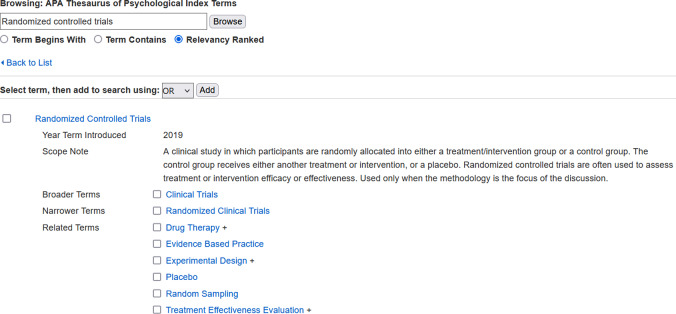 Figure 1
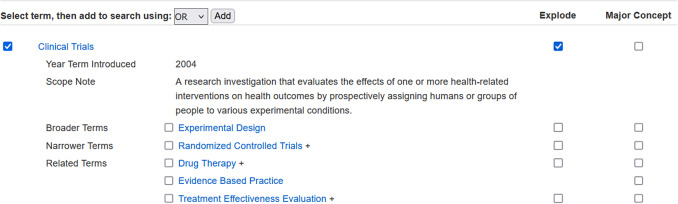 Figure 2
 Figure 3
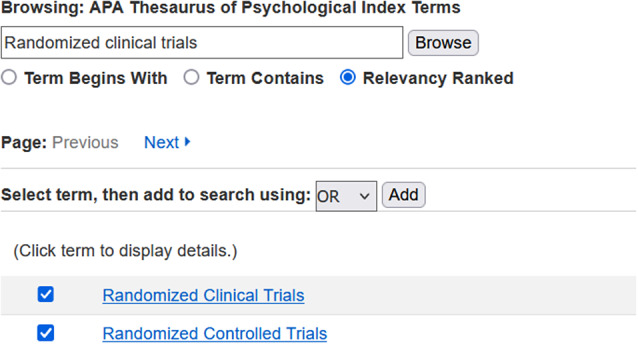 Figure 4
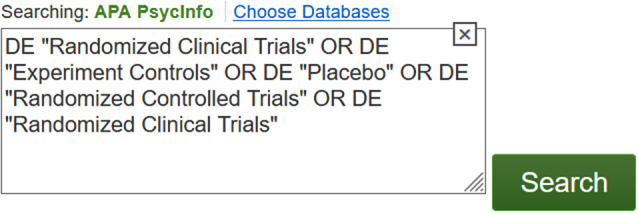 Figure 5
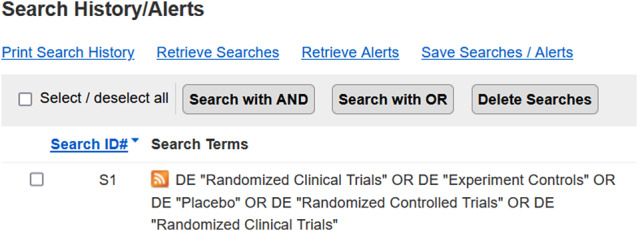 Figure 6
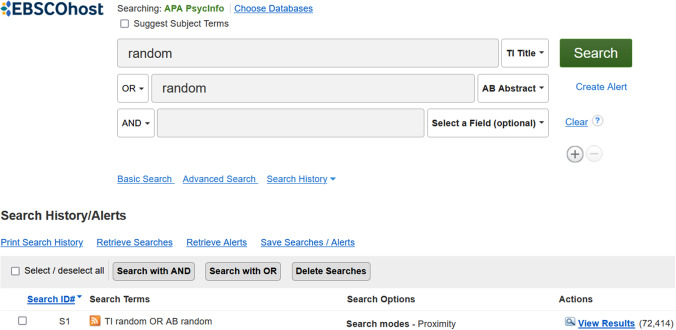 Figure 7
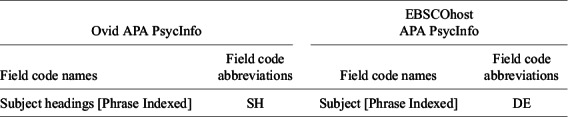 Figure 8
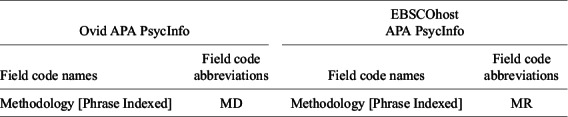 Figure 9
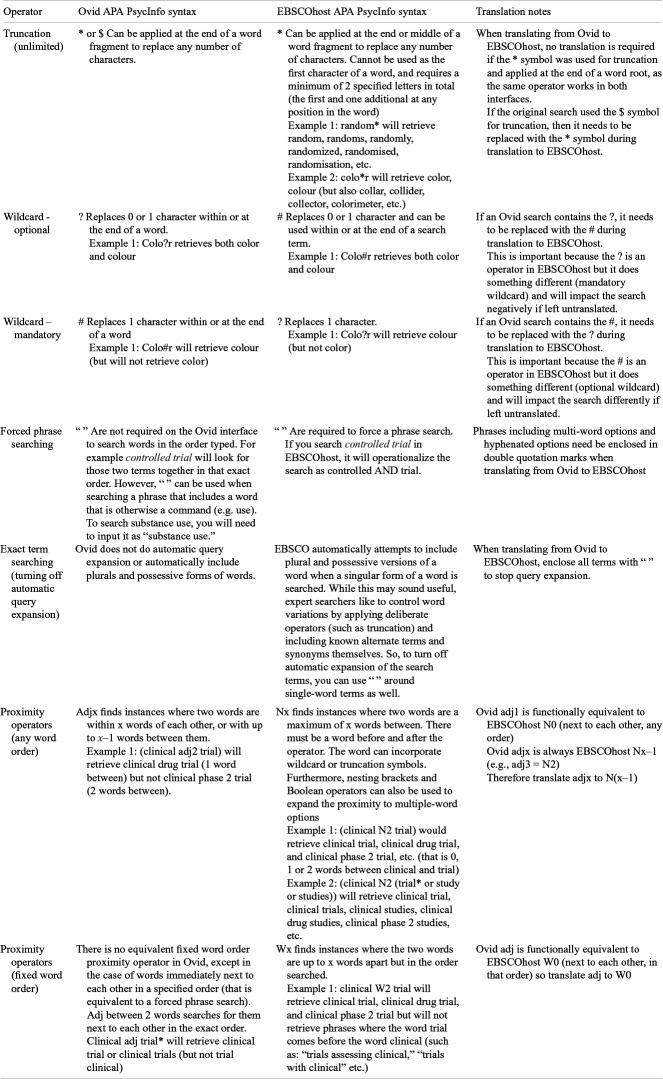 Figure 10
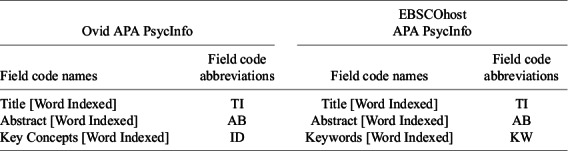 Figure 11
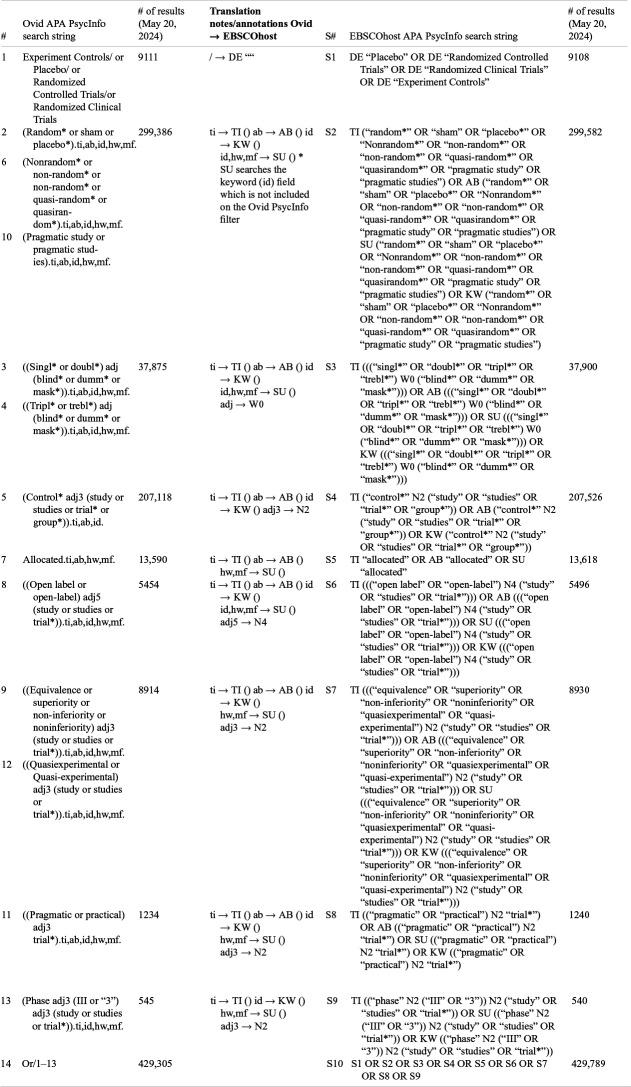 Figure 12
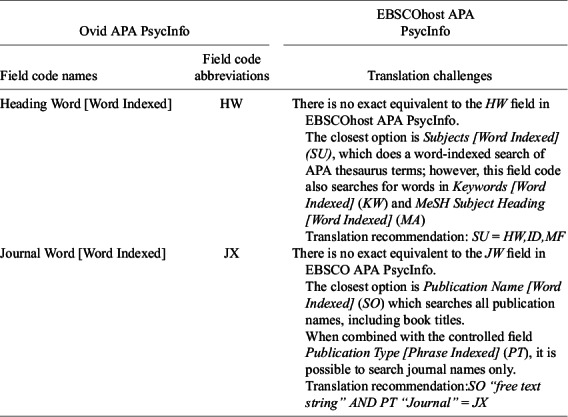 Figure 13
Peer Reviews
No public reviews on file for this paper yet. If you reviewed it on a platform where reviews are public (OpenReview, ICLR, NeurIPS, ICML), you can paste yours below so the community can read it here.
Videos
No videos yet. Explain this paper in a talk, walkthrough, or lecture? Add one.
Taxonomy
TopicsBiomedical Text Mining and Ontologies · Meta-analysis and systematic reviews
Highlights
What is already known
- Search filters, which are single-concept search strategies, are valuable resources used in systematic searches. Common filters include those designed to comprehensively locate literature on a study design or population.
- Filters are customized for a single database (or rarely, a set of databases) in a single interface, and require translation to be used in a different interface.
What is new
- This article demonstrates a process for translation of a search filter for the APA PsycInfo database from the Wolters Kluwer Health Ovid interface to the EBSCO Information Services EBSCOhost interface.
- This article discusses challenges that arise during search filter translation, contextualizing translation processes and decisions with systematic searching principles.
Potential impact for research synthesis methods readers
- Filter translation is a complex process requiring an understanding of information retrieval principles as well as in-depth knowledge of the database and interface.
- This article provides a stepwise approach for filter translation while explaining the workings of the various APA PsycInfo database functions on both the Ovid and EBSCOhost interfaces.
Introduction
1
Basic principles of systematic searching
1.1
The Cochrane Handbook for Systematic Reviews of Interventions1 states that databases should be searched using a combination of two retrieval approaches: using controlled vocabulary and using text words.
Controlled vocabulary are standardized language used to identify records based on content. Controlled vocabulary are applied either by expert indexers or by automated indexing algorithms, and are located in a specific metadata field or fields within a bibliographic record. They are based on a database’s standardized, or controlled, thesaurus, which searchers may use to identify relevant terminology to include in a search. Controlled vocabulary, in the context of systematic searching, are most often concerned with subject-based content identification. They may be referred to as subjects, subject headings, index terms, or descriptors. In this article, we primarily use the term subject headings to distinguish subject-based controlled vocabulary from other controlled fields in APA PsycInfo. APA PsycInfo’s subject headings are found in the APA Thesaurus of Psychological Index Terms (hereafter, the APA Thesaurus), a searchable collection arranged in a hierarchy. The APA Thesaurus’ subject headings are the same in any interface, but the functionality for locating those subject headings differs based on interface, as do the available metadata fields and the syntax that allows them to be incorporated into a search.
Text words, or free text terms, are also searchable in a bibliographic record’s metadata fields. Text words are sometimes referred to as “keywords,” but in this article, we use free text terms for clarity. Title and abstract fields are examples of metadata fields typically searched using free text terms; additional fields, such as author-supplied keywords, are also frequently searched. The searching of free text terms can be made more effective by using search operators such as truncation, wildcards, and proximity operators, which are operationalized by an interface’s syntax (e.g., the * symbol to apply truncation, or a NEAR operator to control proximity searching). As is the case with subject headings, available metadata fields for free text searching may be unique to a database, an interface, or both. Search operators and syntax are also unique in each interface.
Boolean operators (e.g., AND, OR) are used in conjunction with free text terms and subject headings to develop a comprehensive, systematic search strategy. Again, interface-specific syntax must be used when using Boolean operators to construct the search. A search strategy, incorporating all the elements above, may be designed as a single search string, sometimes referred to as a search line, or may use a multiline approach in which several search strings are ultimately combined using Boolean operators (e.g., [line 1 OR line 2]).
Search filters
1.2
Search filters, sometimes referred to as hedges, are single-concept search strategies designed by expert searchers. Search filter concepts are wide-ranging, from study type or population to thematic topics such as economic evaluations or health equity. Like all systematic search strategies, filters are designed to balance sensitivity, which maximizes the number of relevant results, and precision, which minimizes the number of irrelevant results.1 They are thoroughly tested and often validated for their performance.2 As a result, systematic searchers frequently use them as part of their search strategies for evidence synthesis projects.
Search filters contain all the essential components of any systematic search strategy: the subject headings of the database in question, free text terms, and the search operators and syntax of the interface for which they are developed. They are occasionally designed for multiple databases in a single interface, but the majority are intended to search one database at a time.
Two common sources of filters are the InterTASC Information Specialists’ Sub-Group (ISSG) Search Filter Resource, which aggregates published and unpublished filters, and the Canada’s Drug Agency (CDA-AMC, formerly, Canadian Agency for Drugs and Technologies in Health, or CADTH) Search Filters Database, which provides access to filters created by their Research Information Services Filters Working Group.3 ^,^ 4 Both include filters for a variety of topics, databases, and interfaces, which makes them excellent starting points when seeking filters. That said, it’s not unusual to learn that a desired filter does not yet exist.
As a result, it is not surprising that filter translation studies appear in the literature. One example, on translation of an OVID Embase filter to Embase.com, highlights challenges in filter translation while also providing relevant background information.5 Another, showcasing a translation of a filter for economic evaluations from Ovid MEDLINE to the PubMed interface, demonstrates the process and includes a transparent comparison table.6
The authors of this article perform systematic searches for which methodology filters, among others, are particularly useful. Our institutions subscribe to the APA PsycInfo database in the EBSCOhost interface. While CDA-AMC has published many methodology filters for this database, all were designed for the Ovid interface. We undertook a translation project, aiming to adapt the content and the syntax of two Ovid APA PsycInfo filters7 ^,^ 8 for use with the same database, APA PsycInfo, but in the EBSCOhost interface.9 ^,^ 10 This article uses our project to illustrate general principles, inherent challenges, and the technical aspects of translating a search strategy in APA PsycInfo from the Ovid to the EBSCOhost interface. Along the way, we contextualize the translation process with a brief overview of systematic searching principles, to make our decisions more transparent to those without expertise in information retrieval.
Caveats
1.3
We wish to emphasize that effective filter translation, no matter how carefully and expertly executed, does not mean the filters are equivalent or will retrieve the exact same results. Validated filters are tested only in their original form, and unless translators undertake a similar project, there is no way to be sure the translation has not introduced performance issues.
While by no means as challenging as designing a filter from scratch, translation is a complex process requiring expertise in the database, interface, and principles of information retrieval. This article attempts to explain the process at a level of detail accessible to non-experts, but the process should not be attempted without the participation of a trained systematic searcher or information specialist.
Method: tanslating a filter from Ovid APA PsycInfo to EBSCOhost APA PsycInfo
2
The goal of filter translation is to have the translated filter perform exactly as the original did, uncovering the same results in the destination interface. If it cannot perfectly match the original filter’s performance, the aim is to have its results be as similar as possible. Following is our stepwise process for translating an APA PsycInfo filter from the Wolters Kluwer Health Ovid interface (henceforth referred to as Ovid) to the EBSCO Information Services EBSCOhost interface (henceforth EBSCOhost), illustrated primarily through our published translation of CDC-AMC’s Ovid AP PsycInfo RCT/CCT filter.7 ^,^ 9 We also occasionally reference our published translation of the agency’s All Clinical Trials filter.8 ^,^ 10 We believe our overall approach is highly effective for any filter or search strategy translation project for this database in these two interfaces, and the basic concepts could be adapted to search strategy translation in other databases or interfaces.
Translation steps overview
2.1
- Verify the original filter’s subject headings.
- Gather narrower subject headings of any exploded subject headings.
- Check for revised and/or new subject headings incorporated into the APA Thesaurus since the original filter was created.
- Add to the search all of the relevant subject headings from steps 1–3, using the syntax of EBSCOhost.
- For the free text terms, identify and replace the syntax for all search operators, including truncation, wildcards, proximity, phrases, and exact search characters (e.g., preventing stemming or lemmatization).
- Identify the closest matching metadata fields and field codes for free text strings.
- Add to the search all free text search strings, incorporating the EBSCOhost syntax for operators and field codes.
- Combine the final translated search strings.
Controlled vocabulary search strings
2.2
- Verify the original filter’s subject headings.
Verification of subject headings requires the use of the APA Thesaurus. Search each subject heading individually in EBSCOhost APA PsycInfo. Clicking on the subject heading displays information such as the scope note and year of introduction. It also shows its location in the hierarchy, including broader and narrower terms.
In the example below (Figure 1), the subject heading Randomized Controlled Trials is verified, and the information below shows it is narrower than Clinical Trials in the hierarchy, but also has its own narrower term, Randomized Clinical Trials.
- Gather narrower subject headings of any exploded subject headings.
Figure 1. Screenshot of the APA Thesaurus entry for randomized controlled trials in EBSCOhost APA PsycInfo showing the broader and narrower terms available.
As shown in the example above, the APA Thesaurus is arranged in a hierarchy, but not all interfaces operationalize that hierarchy in the same way. The Ovid interface offers syntax, called explosion, that automatically includes both a selected subject heading and its narrower terms, all the way to the bottom of the hierarchy. Essentially, the specified subject heading is combined with every single term below it using a Boolean OR construction. The syntax for explosion in Ovid is exp. Thus, a search for exp Randomized Controlled Trials/ in the Ovid interface actually searches for Randomized Controlled Trials/ OR Randomized Clinical Trials/. The slash (/) in Ovid’s syntax, which may or may not be combined with the explosion syntax, restricts the search to a search in the Subject Headings [Phrase Indexed] metadata field.
The EBSCOhost interface’s equivalent to the Ovid slash (/) is the field code DE. There is, however, no equivalent for Ovid’s exp syntax. EBSCOhost handles explosion differently. Checking the Explode box when searching the APA Thesaurus causes EBSCOhost to use OR to combine only the selected subject heading and the subject heading or headings one level below it in the hierarchy. Narrower terms beneath that (such as second and subsequent levels) are not included. In the example below (Figures 2 and 3), the APA Thesaurus displays the narrower term beneath Clinical Trials in the hierarchy, Randomized Controlled Trials. It indicates there are narrower terms in the hierarchy with a + (plus) sign after Randomized Controlled Trials. Checking Explode in the line for Clinical Trials would result in a search for DE “Clinical Trials” OR DE “Randomized Controlled Trials”; it would not include DE “Randomized Clinical Trials,” which is a narrower term under Randomized Controlled Trials.Figure 2. Screenshot of the APA Thesaurus entry for Clinical Trials in EBSCOhost APA PsycInfo. Figure 3. Screenshot of the search string generated by EBSCOhost APA PsycInfo when the Clinical trials subject heading is selected and exploded.
Since EBSCOhost does not support Ovid’s explosion approach, it is essential to consult the APA Thesaurus to identify all narrower terms, on all lower levels of the hierarchy, that would be included in an Ovid exp search string.
- Check for revised and/or new subject headings incorporated into the APA Thesaurus since the original filter was created.
Controlled vocabulary evolves over time. Existing terms may be removed and replaced with updated terminology or left in place but superseded in new references with that updated terminology. There may also be wholly new additions to the APA Thesaurus. If the filter being translated is a few years old, or if the field of study has evolved or expanded significantly, there may be new or revised terms that should be included in the search. We advise searching the APA Thesaurus and testing the filter with the addition of the new or revised terms.
- Add to the search all of the relevant subject headings from steps 1–3, using the syntax of EBSCOhost.
Subject headings are located in a specific metadata field of the bibliographic record, and must be searched using the exact same strings of characters as they appear in the APA Thesaurus. For example, the APA Thesaurus uses Clinical Trials, not Clinical Trial. Capitalization, however, is not important: clinical trials and Clinical Trials, searched with the correct syntax, will retrieve the same results. A field code is the interface-specific syntax that tells it where and how to search that metadata. We go into greater detail about metadata fields and field codes in Step 6.
In the Ovid interface, the metadata field in which subject headings should be searched is Subject Headings [Phrase Indexed], and the field code to search it is abbreviated as SH. The original filter shows the Ovid syntax, which uses either [term]/ or [term].sh. (The period after sh is part of the search syntax.) An example would be: Randomized Controlled Trials/ or Randomized Controlled Trials.sh. which would retrieve the same results. As stated in Step 2, the EBSCOhost interface syntax for the equivalent field is DE “exact term.” The quotation marks ensure that the subject heading is searched exactly as written, with no stemming or lemmatization. Therefore, the EBSCOhost translation for Randomized Controlled Trials/ is DE “Randomized Controlled Trials” [Table 1].Table 1 Subject heading field code names and abbreviations EBSCOhostOvid APA PsycInfoAPA PsycInfo Field code Field codeField code namesabbreviationsField code namesabbreviationsSubject headings [Phrase Indexed]SHSubject [Phrase Indexed]DE
In EBSCOhost APA PsycInfo, there are two ways to add subject headings to a search strategy:Option 1: Manually construct search strings using subject headings, appropriate syntax, and Boolean operators. A very basic example of this approach is demonstrated above, translating Randomized Controlled Trials/ to DE “Randomized Controlled Trials.”
Option 2: Browsing the APA Thesaurus and using its commands to add one or more subject headings to the search. This is operationalized using checkboxes to select subject headings, and then using buttons to add them to the search with the desired Boolean operators. With this technique, the interface constructs the search string, including all necessary syntax and Boolean operators. As a result, this approach is less prone to errors or omissions than manual translation and is thus the method we recommend.
To execute the method described in option 2:
Search for each subject heading individually, checking the Select term box to the left when you locate it. As long as you remain in the Thesaurus, the interface will bank all selected terms, regardless of how many searches you perform and where selected terms appear in the hierarchical structure. Thus, you can locate and select all the subject headings for a single concept before moving on to the next step [Figure 4].Figure 4 Screenshot of an APA Thesaurus search for randomized Clinical Trials in the EBSCOhost interface.
Once you have identified and checked the boxes for all your subject headings for a concept, go to the “Select term” row, just above the Thesaurus. In the Boolean operator drop-down menu, leave OR selected, then click the Add button. Again, even though you cannot see all your selected terms from this view, the button will accurately populate the database search box [Figure 5].Figure 5. Screenshot of the addition of 4 subject headings to the search screen in EBSCOhost APA PsycInfo.
Click the Search button to add the line to your search history. The screenshot below [Figure 6] shows the Search History after the search is executed.Figure 6. Screenshot of the search history screen of EBSCOhost APA PsycInfo showing the syntax for a subject heading search.
Special considerations: controlled vocabulary beyond the APA Thesaurus
2.2.1
Other controlled fields in APA PsycInfo
2.2.1.1
In the table [Table 2] below, we list another notable controlled field searchable in both APA PsycInfo interfaces, but which is not part of the APA Thesaurus of Psychological Index Terms. “Controlled” in this context means that there is a specific and finite list of exact phrases used for indexing in that metadata field. A list of all controlled fields and the indexed terms for each can be found in the database’s help pages for the relevant interface.11 ^,^ 12 The field in question, Methodology [Phrase Indexed], is available in both Ovid and EBSCOhost. This field does not appear in the worked example in this article but was included in our translation of the All Clinical Trials filter.10Table 2. Methodology field code names and abbreviations EBSCOhostOvid APA PsycInfoAPA PsycInfo Field code Field codeField code namesabbreviationsField code namesabbreviationsMethodology [Phrase Indexed]MDMethodology [Phrase Indexed]MR
One of the controlled fields outside of the APA Thesaurus
2.2.1.2
Medical Subject Headings (MeSH, the controlled vocabulary subject terms used in MEDLINE) can be found in some APA PsycInfo records. The filters we translated did not include those MeSH terms, likely for multiple factors, including lack of access to the MeSH thesaurus in APA PsycInfo and the lack of a phrase-indexed MeSH field in Ovid APA PsycInfo. Thus, our filter also excludes MeSH.
Free text term search strings
2.3
- For the free text terms, identify and replace the syntax for all search operators, including truncation, wildcards, proximity, phrases, and requiring exact characters (e.g., preventing stemming or lemmatization).
Translating a filter as exactly as possible requires finding the closest match for each search operator used in the original filter’s free text search strings. Because not all search interfaces have the same available operators or use the same syntax for the operators they have in common, consulting the help documents for a database on a specific interface is essential.11 ^,^ 12 The table below provides details on translation of operators from the Ovid to EBSCOhost interface. One operator issue unique to EBSCOhost, detailed in the table, is “automatic query expansion.” Single words in EBSCOhost must be enclosed in quotation marks to ensure they are searched as that exact string of characters.
Search operator translation table
2.3.1
The following table [Table 3] provides guidance for translating each search operator from APA PsycInfo in the Ovid interface to the EBSCOhost interface.
- Identify the closest matching metadata fields and field codes for free text strings.
Metadata fields (sometimes referred to as fields or search fields) are the components of a bibliographic record containing information about a reference. Common metadata fields include author name, title, and abstract. Controlled vocabulary, including subject headings, have their own metadata fields, as noted in Step 4. The metadata fields in a database are typically consistent across interfaces. Field codes are the syntax used by an interface to search metadata fields and are unique to that interface. In a given interface, multiple field codes may search the same metadata field but in different ways; alternatively, a single field code may search multiple metadata fields.Table 3. Search operator and syntax table for APA PsycInfo database on the Ovid and EBSCOhost interfacesOperatorOvid APA PsycInfo syntaxEBSCOhost APA PsycInfo syntaxTranslation notesTruncation (unlimited)* or symbol for truncation, then it needs to be replaced with the * symbol during translation to EBSCOhost.Wildcard - optional?Replaces 0 or 1 character within or at the end of a word.Example 1: Colo?r retrieves both color and colour#Replaces 0 or 1 character and can be used within or at the end of a search term.Example 1: Colo#r retrieves both color and colourIf an Ovid search contains the ?, it needs to be replaced with the # during translation to EBSCOhost.This is important because the ? is an operator in EBSCOhost but it does something different (mandatory wildcard) and will impact the search negatively if left untranslated.Wildcard – mandatory#Replaces 1 character within or at the end of a word Example 1: Colo#r will retrieve colour (but will not retrieve color)?Replaces 1 character.Example 1: Colo?r will retrieve colour (but not color)If an Ovid search contains the #, it needs to be replaced with the ? during translation to EBSCOhost.This is important because the # is an operator in EBSCOhost but it does something different (optional wildcard) and will impact the search differently if left untranslated.Forced phrase searching“ ” Are not required on the Ovid interface to search words in the order typed. For example controlled trial will look for those two terms together in that exact order. However, “ ” can be used when searching a phrase that includes a word that is otherwise a command (e.g. use). To search substance use, you will need to input it as “substance use.”“ ” Are required to force a phrase search. If you search controlled trial in EBSCOhost, it will operationalize the search as controlled AND trial.Phrases including multi-word options and hyphenated options need be enclosed in double quotation marks when translating from Ovid to EBSCOhostExact term searching (turning off automatic query expansion)Ovid does not do automatic query expansion or automatically include plurals and possessive forms of words.EBSCO automatically attempts to include plural and possessive versions of a word when a singular form of a word is searched. While this may sound useful, expert searchers like to control word variations by applying deliberate operators (such as truncation) and including known alternate terms and synonyms themselves. So, to turn off automatic expansion of the search terms, you can use “ ” around single-word terms as well.When translating from Ovid to EBSCOhost, enclose all terms with “ ” to stop query expansion.Proximity operators (any word order)Adjx finds instances where two words are within x words of each other, or with up to x–1 words between them.Example 1: (clinical adj2 trial) will retrieve clinical drug trial (1 word between) but not clinical phase 2 trial (2 words between).Nx finds instances where two words are a maximum of x words between. There must be a word before and after the operator. The word can incorporate wildcard or truncation symbols. Furthermore, nesting brackets and Boolean operators can also be used to expand the proximity to multiple-word options Example 1: (clinical N2 trial) would retrieve clinical trial, clinical drug trial, and clinical phase 2 trial, etc. (that is 0, 1 or 2 words between clinical and trial)Example 2: (clinical N2 (trial* or study or studies)) will retrieve clinical trial, clinical trials, clinical studies, clinical drug studies, clinical phase 2 studies, etc.Ovid adj1 is functionally equivalent to EBSCOhost N0 (next to each other, any order)Ovid adjx is always EBSCOhost Nx–1 (e.g., adj3 = N2)Therefore translate adjx to N(x–1)Proximity operators (fixed word order)There is no equivalent fixed word order proximity operator in Ovid, except in the case of words immediately next to each other in a specified order (that is equivalent to a forced phrase search).Adj between 2 words searches for them next to each other in the exact order.Clinical adj trial* will retrieve clinical trial or clinical trials (but not trial clinical)Wx finds instances where the two words are up to x words apart but in the order searched.Example 1: clinical W2 trial will retrieve clinical trial, clinical drug trial, and clinical phase 2 trial but will not retrieve phrases where the word trial comes before the word clinical (such as: “trials assessing clinical,” “trials with clinical” etc.)Ovid adj is functionally equivalent to EBSCOhost W0 (next to each other, in that order) so translate adj to W0
In free text search strings, specifying metadata fields, and intentionally selecting the field codes with which to search them, serves two main purposes.
First, it allows the searcher to restrict the search for any given concept to fields they deem appropriate or necessary. Not all fields are relevant for all concepts. In EBSCOhost APA PsycInfo, if no field code is specified, an “unqualified search” is performed; this uses a default set of field codes, which include AU, or Author [Word Indexed]. AU searches the metadata fields for author and institutional author. When developing a free text search string for the concept of parks, one might include the truncated term park*. A search for the term park* in a bibliographic record’s title or abstract metadata fields would be helpful, while a search in author name fields would add potentially irrelevant results, often referred to as “noise,” written by an author named Parker. An unqualified search for park* would inevitably introduce significant noise. Thoughtfully selecting metadata fields reduces that noise and thus improves precision. The most common metadata fields to include in a search are title, abstract, and author keyword fields.1 ^,^ 13 Additional fields that are sometimes considered include journal or source name, geographic region, or subject classification.
Second, specifying metadata fields improves both transparency and reproducibility. Using the example of EBSCOhost’s “unqualified search,” the metadata fields searched differ from database to database (e.g., an unqualified search in APA PsycInfo and CINAHL, both available in the EBSCOhost interface, does not search the same metadata fields or use the same field codes). There is also no guarantee these default fields will be consistent over time. Deliberately selecting metadata fields thus makes it clear which fields were searched and makes it possible to replicate the search in future.
When translating a filter, the aim is to match, as closely as possible, the way metadata fields were searched in the original filter. A database will typically have the same metadata fields regardless of interface, but the available field codes, which determine how that metadata is searched, may differ across interfaces. It’s essential to understand what and how field codes are searching to identify the field codes in the target interface that best match the performance of the original filter.
In the table [Table 4] below, we provide examples of three field codes used in the original Ovid filter that have simple EBSCOhost equivalents. Title is an example where the metadata field being searched by the field code is the same, the field code operationalizes the metadata search in the same way (word-indexed search of the title metadata), and the field code abbreviation happens to be the same (TI). Ovid’s Key Concepts [Word Indexed] (ID) field code searches the same metadata (author keywords) in the same way as EBSCOhost’s Keywords [Word Indexed] (KW), even though the field code names and abbreviations differ. However, when there are significant differences in available field codes, more complex decisions must be made. We address two examples of this in the discussion section.
- Add to the search all free text search strings, incorporating the EBSCOhost syntax for operators and field codes. Table 4. Field code names and abbreviations for title, abstract, and author-keyword fields EBSCOhostOvid APA PsycInfoAPA PsycInfo Field code Field codeField code namesabbreviationsField code namesabbreviationsTitle [Word Indexed]TITitle [Word Indexed]TIAbstract [Word Indexed]ABAbstract [Word Indexed]ABKey Concepts [Word Indexed]IDKeywords [Word Indexed]KW
Searching using field codes is operationalized differently on the Ovid and EBSCOhost interfaces. In the Ovid interface, field codes are included at the end of a search string. They are preceded by a period (.), followed by the 2-letter field code in lowercase, and ended with a period (.). Ovid will add the final period automatically if a searcher does not include it. Multiple fields can be stacked (that is combined with an OR) in the same search string by separating field codes with a comma. Multiple terms may be used in the same search string if grouped using parentheses. The syntax can be typed by the searcher when working in the Advanced search tab. Alternatively, the field codes can be selected using checkboxes when working in the Search fields tab or individually selected using drop-down menus when working in the Multi-field search tab. The examples below assume the searcher is manually typing the field codes in the Advanced search tab of the database.
For example:
- To search the word random in the title: random.ti.
- To search the word random in the title or abstract: random.ti,ab.
- To search the words random or randomly in the title or abstract: (random or randomly).ti,ab.
EBSCOhost also uses field codes and, as in Ovid, searches can be constructed manually using the two-letter abbreviations in uppercase (e.g., TI or AB). However, the more common approach is to use the Advanced search tab, in which metadata fields are available as drop-down options. Unlike in the Ovid interface, EBSCOhost only allows one field to be applied per line, but Boolean operators may be used to combine multiple lines into what will ultimately be a single search string. Multiple terms may be used in each line. Once the search button is clicked, EBSCOhost translates the query into its syntax, including adding field codes and, as needed, parentheses around search strings.
For example:
- To search the word random in the title, enter the search string in the box and select TI Title in the drop-down menu; EBSCOhost translates this as TI random
- To search the word random in the title or abstract, enter the search string in the first box and select TI Title in the drop-down menu, then enter the same search string on the second line and select AB Abstract in the drop-down menu. Finally, select the Boolean operator OR between the two lines. EBSCOhost translates this as TI random OR AB random [Figure 7]
- To search the words random or randomly in the title or abstract, use the same construction as in example 2, with the search string random OR randomly; EBSCOhost translates this as TI (random OR randomly) OR AB (random OR randomly) Figure 7. Screenshot of searching the term random in the title or abstract field in EBSCOhost APA PsycInfo.
Combining search strings
2.4
- Combine the final translated search strings.
In the case of a filter, all search lines are part of the same concept and are combined with the Boolean operator OR. Both the EBSCOhost and Ovid interfaces provide two options for combining search lines: using checkboxes followed by clicking a button, or manually constructing the search using the interface’s syntax.
In the Ovid interface, the Search History is located at the top of the page. In some cases, you will need to click on Search History to view the content or click Expand at the bottom right of the Search History section to view all search lines. Once all lines are visible, the boxes next to each desired line can be checked. At the bottom center of the Search History area, locate the Combine with: text and click the OR button to combine all selected lines with OR.
The other option in Ovid is to manually construct the Boolean search. Search lines in Ovid are identified by numbers. The syntax to combine lines is line OR line. So, in the case of a four-line search, the search would be: 1 OR 2 OR 3 OR 4. An alternative way of operationalizing this is to use the desired Boolean operator followed by a slash, then followed by the range of search lines separated with a hyphen. The syntax for that is: or/1–4.
In the EBSCOhost interface, the search history can be accessed by clicking the Search History link below the search box or boxes. As in Ovid, you can check the lines to combine, then use the Search with OR button to combine them with a Boolean OR. Unlike Ovid, EBSCOhost uses the letter S followed by a number to identify the search line. So, in the case of a four-line search, the correct syntax would be: S1 OR S2 OR S3 OR S4. This can be typed into the search box in either the Basic or Advanced Search.
Special considerations: multiline versus single line filters
2.4.1
While some filters are designed as a single line, most are expressed in a multiline format. When translating, consider the challenges inherent in copying and pasting numerous lines into a database search, which can be tedious and may introduce errors or omissions. We elected to combine some lines where possible during our translation, such as merging controlled vocabulary lines together or merging all lines that use identical adjacency operators (e.g., (free text string) within 5 words of (free text string), using the interface’s syntax).
However, we did not go so far as making it a single-line search strategy. Single-line searches have other challenges, including being more challenging to read. That makes it more difficult to translate them or to identify small errors. In addition, some interfaces may have limitations in the number of characters or words allowed in a single search string, which may make using a single-line search impossible.
In the two filters that we translated, we transformed what were originally 19 and 14 line filters in the Ovid interface to 10 lines each in EBSCOhost. We did this as a final step after carefully translating the filter line by line and then rigorously testing our merged versions. Individuals translating filters will need to decide for themselves whether they prefer to retain the exact structure of the original filter, balancing clarity and ease of use with the limitations of database interfaces.
Worked example
2.5
Table 5 below shows a line-by-line comparison for the Ovid APA PsycInfo RCT/CCT filter7 translated to EBSCOhost APA PsycInfo.9 The table includes record numbers for each line along with some translation notes. This format allows for comparison of each translated line to the original based on the number of records resulting from each line. Note that small differences between result numbers can be expected due to differences in processing and indexing of records between the two interfaces.Table 5 Mapped line-by-line translation for the CDA-AMS RCT/CCT filter for APA PsycInfo database from Ovid to EBSCOhost interface7 ^,^ 9
of results
Translation
of results
Ovid APA PsycInfo(May 20, notes/annotations Ovid
(May 20,#search string2024) → EBSCOhost S#EBSCOhost APA PsycInfo search string2024)1Experiment Controls/ or Placebo/ or Randomized Controlled Trials/or Randomized Clinical Trials9111/ → DE ““S1DE “Placebo” OR DE “Randomized Controlled Trials” OR DE “Randomized Clinical Trials” OR DE “Experiment Controls”91082(Random* or sham or placebo*).ti,ab,id,hw,mf.299,386ti → TI ()ab → AB ()id → KW ()id,hw,mf → SU ()* SU searches the keyword (id) field which is not included on the Ovid PsycInfo filterS2TI (“random*” OR “sham” OR “placebo*” OR “Nonrandom*” OR “non-random*” OR “non-random*” OR “quasi-random*” OR “quasirandom*” OR “pragmatic study” OR “pragmatic studies”) OR AB (“random*” OR “sham” OR “placebo*” OR “Nonrandom*” OR “non-random*” OR “non-random*” OR “quasi-random*” OR “quasirandom*” OR “pragmatic study” OR “pragmatic studies”) OR SU (“random*” OR “sham” OR “placebo*” OR “Nonrandom*” OR “non-random*” OR “non-random*” OR “quasi-random*” OR “quasirandom*” OR “pragmatic study” OR “pragmatic studies”) OR KW (“random*” OR “sham” OR “placebo*” OR “Nonrandom*” OR “non-random*” OR “non-random*” OR “quasi-random*” OR “quasirandom*” OR “pragmatic study” OR “pragmatic studies”)299,5826(Nonrandom* or non-random* or non-random* or quasi-random* or quasirandom*).ti,ab,id,hw,mf.10(Pragmatic study or pragmatic studies).ti,ab,id,hw,mf.
3((Singl* or doubl*) adj (blind* or dumm* or mask*)).ti,ab,id,hw,mf.37,875ti → TI ()ab → AB ()id → KW ()id,hw,mf → SU ()adj → W0S3TI (((“singl*” OR “doubl*” OR “tripl*” OR “trebl*”) W0 (“blind*” OR “dumm*” OR “mask*”))) OR AB (((“singl*” OR “doubl*” OR “tripl*” OR “trebl*”) W0 (“blind*” OR “dumm*” OR “mask*”))) OR SU (((“singl*” OR “doubl*” OR “tripl*” OR “trebl*”) W0 (“blind*” OR “dumm*” OR “mask*”))) OR KW (((“singl*” OR “doubl*” OR “tripl*” OR “trebl*”) W0 (“blind*” OR “dumm*” OR “mask*”)))37,9004((Tripl* or trebl*) adj (blind* or dumm* or mask*)).ti,ab,id,hw,mf.5(Control* adj3 (study or studies or trial* or group*)).ti,ab,id.207,118ti → TI ()ab → AB ()id → KW ()adj3 → N2S4TI (“control*” N2 (“study” OR “studies” OR “trial*” OR “group*”)) OR AB (“control*” N2 (“study” OR “studies” OR “trial*” OR “group*”)) OR KW (“control*” N2 (“study” OR “studies” OR “trial*” OR “group*”))207,5267Allocated.ti,ab,hw,mf.13,590ti → TI ()ab → AB ()hw,mf → SU ()S5TI “allocated” OR AB “allocated” OR SU “allocated”13,6188((Open label or open-label) adj5 (study or studies or trial*)).ti,ab,id,hw,mf.5454ti → TI ()ab → AB ()id → KW ()id,hw,mf → SU ()adj5 → N4S6TI (((“open label” OR “open-label”) N4 (“study” OR “studies” OR “trial*”))) OR AB (((“open label” OR “open-label”) N4 (“study” OR “studies” OR “trial*”))) OR SU (((“open label” OR “open-label”) N4 (“study” OR “studies” OR “trial*”))) OR KW (((“open label” OR “open-label”) N4 (“study” OR “studies” OR “trial*”)))54969((Equivalence or superiority or non-inferiority or noninferiority) adj3 (study or studies or trial*)).ti,ab,id,hw,mf.8914ti → TI ()ab → AB ()id → KW ()hw,mf → SU ()adj3 → N2 S7TI (((“equivalence” OR “superiority” OR “non-inferiority” OR “noninferiority” OR “quasiexperimental” OR “quasi-experimental”) N2 (“study” OR “studies” OR “trial*”))) OR AB (((“equivalence” OR “superiority” OR “non-inferiority” OR “noninferiority” OR “quasiexperimental” OR “quasi-experimental”) N2 (“study” OR “studies” OR “trial*”))) OR SU (((“equivalence” OR “superiority” OR “non-inferiority” OR “noninferiority” OR “quasiexperimental” OR “quasi-experimental”) N2 (“study” OR “studies” OR “trial*”))) OR KW (((“equivalence” OR “superiority” OR “non-inferiority” OR “noninferiority” OR “quasiexperimental” OR “quasi-experimental”) N2 (“study” OR “studies” OR “trial*”)))893012((Quasiexperimental or Quasi-experimental) adj3 (study or studies or trial*)).ti,ab,id,hw,mf.11((Pragmatic or practical) adj3 trial*).ti,ab,id,hw,mf.1234ti → TI ()ab → AB ()id → KW ()hw,mf → SU ()adj3 → N2S8TI ((“pragmatic” OR “practical”) N2 “trial*”) OR AB ((“pragmatic” OR “practical”) N2 “trial*”) OR SU ((“pragmatic” OR “practical”) N2 “trial*”) OR KW ((“pragmatic” OR “practical”) N2 “trial*”)124013(Phase adj3 (III or “3”) adj3 (study or studies or trial*)).ti,id,hw,mf.545ti → TI ()id → KW ()hw,mf → SU ()adj3 → N2S9TI ((“phase” N2 (“III” OR “3”)) N2 (“study” OR “studies” OR “trial*”)) OR SU ((“phase” N2 (“III” OR “3”)) N2 (“study” OR “studies” OR “trial*”)) OR KW ((“phase” N2 (“III” OR “3”)) N2 (“study” OR “studies” OR “trial*”))54014Or/1–13429,305S10S1 OR S2 OR S3 OR S4 OR S5 OR S6 OR S7 OR S8 OR S9429,789
Discussion
3
As expert searchers, we find search filters, whether validated filters or unvalidated previously published single concept search strings, to be a valuable resource in constructing systematic search strategies. Many existing filters are created using a rigorous process of design, testing, and validation, and the resulting search strategies are thus considered comprehensive. The limited selection of these filters poses a challenge. It is particularly frustrating when filters exist for the desired database, but are designed for a different interface than is available to the searcher. It is true that, even if an exact match translation were possible, validation cannot be assumed to transfer with the translation. But in cases where a search filter is needed, and is available for the desired database in one interface, we believe creating a high-quality translation is a reasonable approach.
In this article, we attempt to address some of the broader issues surrounding translating a search filter and use as our case example our translation of an APA PsycInfo filter from the Ovid to EBSCOhost interface. Above we demonstrate our stepwise translation process. Here we discuss some of the inherent issues in the execution of those steps.
Controlled vocabulary
3.1
Steps 1 and 2 of our process, verifying subject headings and gathering narrower terms, are fairly straightforward. Step 3, checking for new relevant subject headings added to a database, is more nuanced. Filters may become outdated over time, due to changes in existing subject headings or the addition of new ones, but changes to controlled vocabulary strings will inevitably change a filter’s performance in terms of sensitivity or precision. The addition of new subject headings is most likely to leave the sensitivity unchanged (or even improve it), but could impact the filter’s precision. However, the bias introduced by not updating terms where necessary could negatively impact its sensitivity. Systematic searches typically prioritize sensitivity over precision, so this would generally be an acceptable outcome.
Search operators
3.2
Steps 4 and 5 focus on interface-specific search operators and the syntax used to operationalize them. It is essential to verify the syntax for each operator used in the original filter, and to compare the available operators and associated syntax in the target interface, to avoid unexpected performance issues. If an operator is available in both interfaces, the syntax may be the same or different. In some cases, operators available in one interface may have no exact match in another, so a truly equivalent translation may simply not be possible. In such cases, a close match may be the best one can achieve, and this should be noted as a significant limitation when documenting the translation.
Operators available in both interfaces: two examples
3.2.1
Both Ovid and EBSCOhost have an operator for truncation at the end of a search term, replacing one or more characters. It is operationalized in both interfaces with an asterisk (**). Both Ovid and EBSCOhost have an operator for mandatory and optional wildcards, but they, in this case, use different syntax. In Ovid, the syntax for the mandatory wildcard, replacing one character, is the hashtag (#), while the optional wildcard, replacing 0 or 1 character, is a question mark (?*); in the EBSCOhost interface, the syntax is reversed. Missing the translation step of these wildcards, which can easily occur due to their placement within free text terms, can lead to significant performance issues. This is especially the case if an optional wildcard is mistranslated into a mandatory wildcard during translation. For example, in searching for the terms colour or color, an Ovid filter may use the optional wildcard in the term color?. It would be easy to miss the need to change the? to a #. However, if colo?r in Ovid is mistranslated to colo?r in the EBSCOhost interface, then the filter will fail to retrieve results with the term color, since the? works as a mandatory wildcard in EBSCOhost. While these wildcards were not used in our filter translation example, other filters may use one or both wildcards.
Operators not available in both interfaces
3.2.2
Both EBSCOhost and Ovid offer proximity operators, but only EBSCOhost has one that requires the words to be in a fixed order. EBSCOhost’s Within Operator (Wx) finds words within x number of words of one another, in the order in which they are entered; whereas, the Near Operator (Nx) allows the words to be in any order. The Ovid interface’s Adjacency operator (adjx) allows the words to be in any order, so it best matches Near in EBSCOhost. Therefore, if one were translating a search string such as controlled W3 trial from EBSCOhost APA PsycInfo to Ovid APA PsycInfo (the opposite direction of the worked example included here), an exact translation would not be possible, because there is no exact match for W3 in Ovid.
Metadata fields and field codes
3.3
In Step 6, the metadata fields searched by the original filter, and how the interface’s field codes were used to search them, must be identified and compared to available metadata fields and field codes in the target interface. In many cases, there is a field code whose performance closely or exactly matches that of the original filter. There are some examples in Ovid and EBSCOhost, unfortunately, where available field codes differ significantly.
For example, in the Ovid interface, the metadata field Subject Headings contains the controlled vocabulary in the APA Thesaurus. The field code SH searches in the Subject Headings metadata field for phrases. Thus, the SH field is referred to in the documentation as Subject Headings [Phrase Indexed]. 11 This is the field code we translated to EBSCOhost’s DE, Subject [Phrase Indexed], in Step 4. Both DE and SH perform the same exact phrase, exact character search in subject headings from the APA Thesaurus. Ovid also offers the field code HW, or Heading Word [Word Indexed], which does a search for individual words in the Subject Headings metadata field. Thus, two field codes search the same metadata field, but in different ways. HW is used when searching free text terms in the original Ovid filter, and its lack of an exact equivalent in EBSCOhost creates challenges in translating APA PsycInfo filters between the two interfaces.
The only field code in EBSCOhost APA PsycInfo that performs a word-indexed (not phrase-indexed) search of APA Thesaurus subject headings is Subjects [Word Indexed] (SU). However, that single field code in EBSCOhost, SU, also searches Keywords [Word Indexed] (KW, equivalent to Key Concepts [Word Indexed], or ID, in Ovid), and MeSH Subject Heading [Word Indexed] (MA, equivalent to MeSH Word [Word Indexed], or MF, in Ovid). Thus, this one field code actually searches three metadata fields,11 two of which were not part of search strings in the original filter that used HW. When confronted with a metadata field or field code that lacks an exact equivalent, it is best to err on the side of choosing a field code that adds more sensitivity. This may unintentionally reduce precision, but that is preferable to the alternative.
In some situations, it is ambiguous whether differences in available metadata fields or field codes are tied to the database, the interface, or both. One example we encountered was when we attempted to translate CDA-AMC’s Ovid APA PsycInfo Qualitative Studies filter.14 The original filter uses Ovid’s Journal Word [Word Indexed] (JX) field code. There is no exact match in EBSCOhost APA PsycInfo; the closest translation is Publication Name [Word Indexed] (SO), which includes all publication titles, not just journals. To most accurately translate this search line, we chose the SO field code in conjunction with another controlled field, Publication Type [Phrase Indexed] (PT) (i.e., SO “free text string” AND PT “Journal”) [Table 6].Table 6. Field code names and abbreviations for additional fields EBSCOhost APAOvid APA PsycInfoPsycInfo Field code Field code namesabbreviationsTranslation challengesHeading Word [Word Indexed]HWThere is no exact equivalent to the HW field in EBSCOhost APA PsycInfo.The closest option is Subjects [Word Indexed] (SU), which does a word-indexed search of APA thesaurus terms; however, this field code also searches for words in Keywords [Word Indexed] (KW) and MeSH Subject Heading [Word Indexed] (MA)Translation recommendation: SU = HW,ID,MF Journal Word [Word Indexed]JXThere is no exact equivalent to the JW field in EBSCO APA PsycInfo.The closest option is Publication Name [Word Indexed] (SO) which searches all publication names, including book titles.When combined with the controlled field Publication Type [Phrase Indexed] (PT), it is possible to search journal names only.Translation recommendation: SO “free text string” AND PT “Journal” = JX
In rare cases, field codes or their behavior may have changed since the original filter was designed. Therefore, when selecting metadata fields, always consult the interface’s help documentation.
Checking translation performance
3.4
The motivation for translating from one interface to another is most often lack of access to the original. That makes it difficult to compare the performance of the translation to that of the original filter. We recommend reaching out to others in your network who may be able to execute the search strategy or filter in the original interface and share the search history table, including line-by-line numbers of results. This can help you identify significant differences or errors. Line-by-line results that are similar in magnitude, even if not exactly the same, can provide some confirmation that the translation is a close match.
Reporting translations
3.5
Reproducibility and the sharing of as-run exact search strategies are expected as part of the Preferred Reporting Items for Systematic Reviews and Meta-analysis (PRISMA) and PRISMA-Search guidelines.15 ^,^ 16 The search strategies are typically included in the appendices or supplementary materials of the manuscript or in an external repository (e.g., OSF, SearchRxiv, or an institutional repository). When existing filters are used or adapted, authors are expected to report and cite the filter within the final manuscript (checklist item 10 of PRISMA-S). There is a growing trend to annotate the search via a search narrative17 as a way to explain decisions made during the search creation process. We recommend researchers performing filter translations use a similar model of citing and annotating to thoroughly document and explain the translation equivalencies used and any potential limitations.
Essential skills for translation
3.6
While we have attempted in this article to address some principles of systematic searching and translation in a way that provides context and clarity for non-experts, it should be apparent from the detailed and nuanced approach discussed in this tutorial that experience and expertise with databases and interfaces is an essential prerequisite for creating a high-quality translation. Even as librarians with significant background and training in creating systematic searches in many database interfaces, we still gained insight into APA PsycInfo, Ovid, and EBSCOhost during this process. Less experienced searchers should work with an experienced librarian to translate searches to ensure that the translation is error-free and as comprehensive as possible.
Conclusion
4
A stepwise process of translating a systematic search strategy designed for APA PsycInfo from the Ovid to the EBSCOhost interface is presented above, using a search filter translation as illustration. A worked example with line-by-line results in each interface shows that the filter translation does not perform exactly as the original. Reasons for this include differences between available metadata fields, operators, and syntax in the two interfaces, as well as delays in processing and indexing of records. The process defined in this article could be used for future translations of filters or systematic search strings for APA PsycInfo between the Ovid and EBSCOhost interfaces, but the overall principles may also be applied to other databases or interfaces. Researchers should consider working with a trained information specialist or systematic searcher when undertaking this task.
The reference list from the paper itself. Each links out to its DOI / PubMed record.
- 1Lefebvre C , Glanville J , Briscoe S , et al. Searching for and selecting studies. In: Higgins JPT , Thomas J , Chandler J , et al., eds. Cochrane Handbook for Systematic Reviews of Interventions. 6.4.; 2023:Chapter 4. https://training.cochrane.org/handbook/current/chapter-04#section-4-4. Accessed July 29, 2024.
- 2Jenkins M. Evaluation of methodological search filters—a review. Health Info Libr J 2004;21(3):148–163. 10.1111/j.1471-1842.2004.00511.x 15318913 · doi ↗ · pubmed ↗
- 3Canada’s Drug Agency. CDA Search Filters Database. 2024. https://searchfilters.cda-amc.ca/. Accessed October 29, 2024
- 4Glanville J , Lefebvre C , Manson P , Robinson S , Brbre I , Woods L. The ISSG Search Filter Resource. 2024. https://sites.google.com/a/york.ac.uk/issg-search-filters-resource/home
- 5Glanville J , Foxlee R , Wisniewski S , Noel-Storr A , Edwards M , Dooley G. Translating the Cochrane EMBASE RCT filter from the Ovid interface to Embase.com: a case study. Health Info Libr J 2019;36(3):264–277. 10.1111/hir.12269 31328866 · doi ↗ · pubmed ↗
- 6Neyt M , Chalon PX . Search MEDLINE for economic evaluations: tips to translate an OVID strategy into a Pub Med one. Pharmacoeconomics 2013;31(12):1087–1090. 10.1007/s 40273-013-0103-0 24202991 · doi ↗ · pubmed ↗
- 7Canada’s Drug Agency. RCT/CCT – Psyc Info (Ovid). CDA Search Filters Database. October 20, 2023. Accessed October 29, 2024.
- 8Canada’s Drug Agency. All Clinical Trials - Psyc Info (Ovid). CDA Search Filters Database. February 6, 2024. Accessed October 29, 2024. https://searchfilters.cda-amc.ca/link/118